ReacTails for Vbridger
A downloadable Vbridger Formula
ReacTails it is a set of formulas and explanation with simple math that allows the usage of smooth reactive tails for any Live2D Model


These formulas allows different types of tails and motions to be produced, just using math and the way VBridger works:

Allowing to:
- Smooth change of speed between idle and happy
- Change the trigger value of mouthsmile
- Change speed of Idle and Happy
- Change the (des)acceleration of the speed
- Change delay between Tail sections
- Change amplitude of tail movement
- With further understanding you can modify the formulas even more to have custom amplitudes or extra features like stopping when angry, or change tail angles
- You need a L2D model with a tail/wing/anything with a wave movement.
- You NEED Vbridger editor to edit the formulas.
- If you need a specific tail movement ask your rigger to read, #How it works.
- If you are a vtuber and want this, please request your rigger to read this.
- If you are a vtuber/rigger and you used other reactive tails methods this will not work without an update (or overriding the physics/blendshape inputs).
- If you are a rigger and can't figure out (or don't want to), you can commission me for a custom formula.
Instructions:
You NEED Vbridger editor to edit the formulas
The default values will works for most tails.
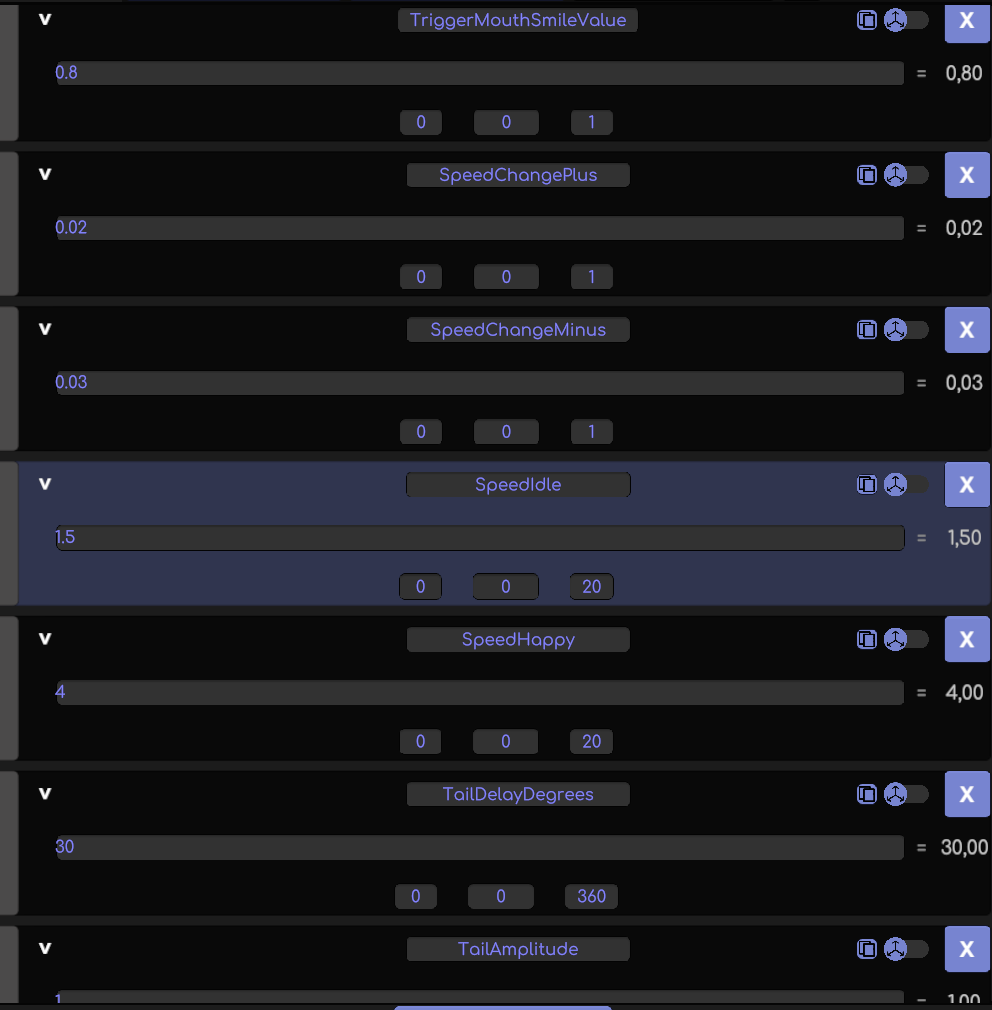
You have 7 parameters that you can edit to your model tail, in an easy way
https://store.steampowered.com/app/1943350/VBridger__Editor/
If you have a base custom vbridger file you need to add not just these 7 parameters but everything else under BrowInnerUp (in the editor)
- First we rig the tail normally, dont need to do an idle animation, neither blend shape weights, dont need to do anything fancy, just rig the tail sections into parameters, just skinning it also works.
- We go into vbridger and press LOAD, and then select the file you just downloaded [ReactiveTail-Kato-Public.vbridger] and connect vbridger into vtube studio.
- We go to Vtube studio and we link the param SinWave1 to the first tail section
Depending on the tail you can adjust the smoothing, i recommend not over 5 or it will be cut short the total movement.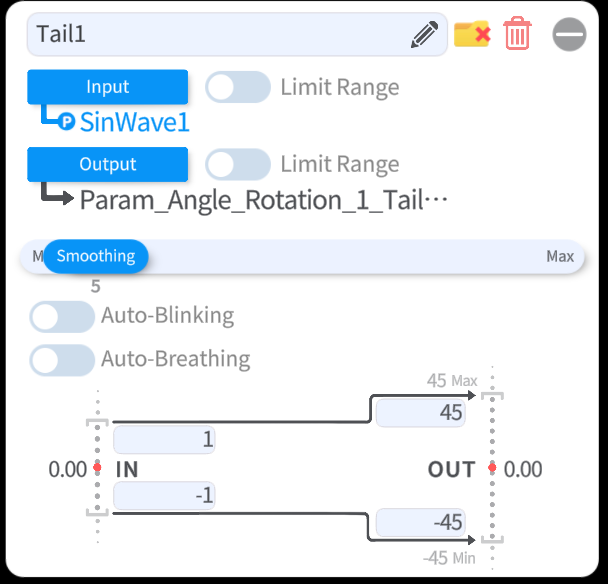
- We do that for each tail section, up to whatever tail section you have in this case 6 tail sections, the formula accepts up to 9 tails sections, BUT adding more sections SinWave# is as easy as copy paste the last formula and change one number (Explained more on 7.- #How it works)
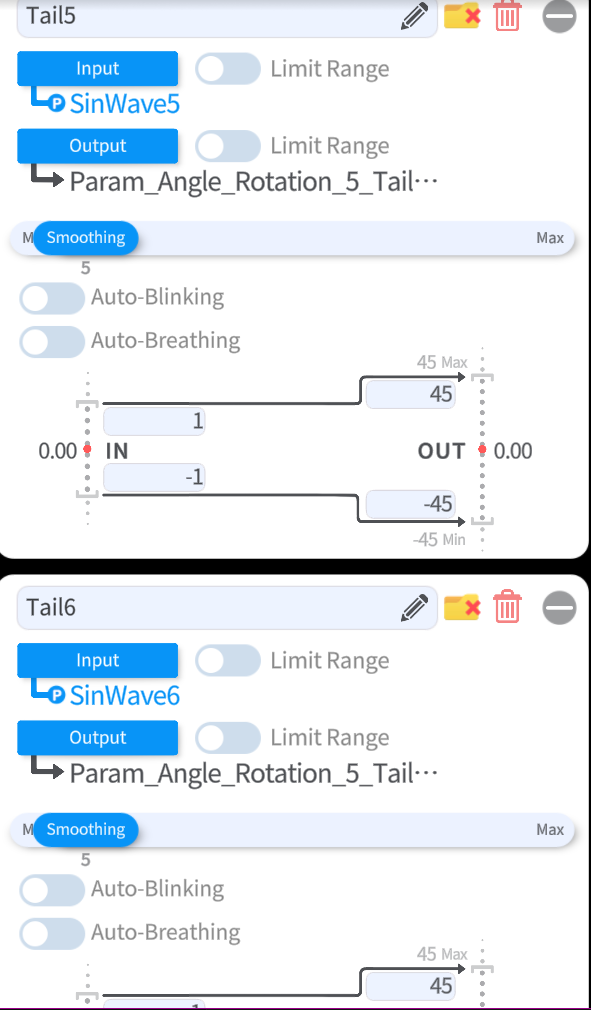
- That it is, should be working now, if you want further adjustements continue on the next steps.
- Trigger Mouth Smile Value

This value defines when the change of speed will trigger in respect to mouth smile.
Mouth Smile goes from 0 to 1 (0 = frown - 1 = Happy) so 0.8 for example is really close to happy. - SpeedChangePlus/Minus
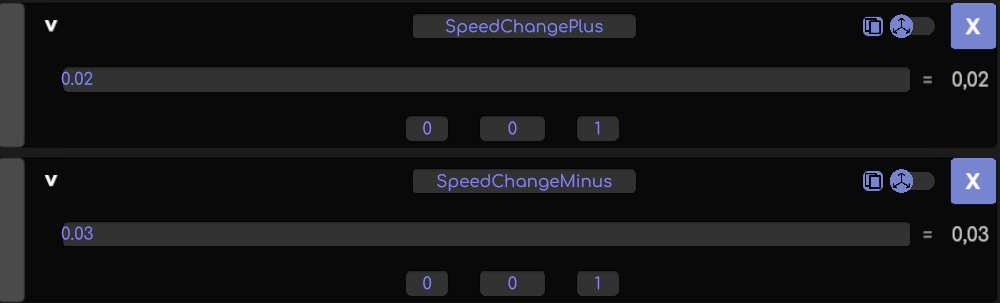
SpeedChangePlus is the acceleration from Idle Tail to Happy Tail , higher numbers is faster change, use low value numbers.
SpeedChangeMinus is the desacceleration from Happy Tail to Idle tail ,higher numbers is faster change, I recommend being higher than the Plus, but not by much. - SpeedIdle

This value defines the idle tail Speed, higher numbers is faster idle tail movement, lower numbers is slower idle speed. - SpeedHappy

This value defines the happy tail speed, higher numbers is faster happy tail movement, lower numbers is slower happy tail speed. reminder this is the MAX value it will reach. - TailDelayDegrees

This value defines the delay that each tail section will have compared to the section before, I recommend values between 15 and 45 degrees - TailAmplitude

This value defines the maximum amplitude the tail will have during the entire movement, 0 is no movement 1 is the entire range of movement, more explained on 6.- #How It Works - That is it, any changes done to the values gets updated once you click away and you can see the result in real time on the model, remember to press save and send that file to the client (or well use it if you are doing it c:)
How it works:
- Okay you are here because you want something even more custom, and that is great, this has just extremelly simple programming but, I will try to go step by step on how it works.
- MouthDetector

This is an "If" parameter, it is extremely simple, this detects if the value of "TriggerMouthSmileValue" is reached, once reached it outputs a 1, if it doesn't reach it, it outputs a -1 (Sorry Binary). - MouthAccel

This "If" parameters detects when it needs to accelerate, if it detects that MouthDetector is 1, it will accelerate with SpeedChangePlus, and if it detects mouthdetector is not enabled it will desaccelerate with SpeedChangeMinus
MouthAccelValue is below this to just adjust one issue wiht negative values. - Angle1

This parameter looks like an "If" but it just counts up from 0 to 360 and it repeats
It goes up each frame (Vbridger runs at 60fps) by [SpeedIdle +(MouthAccelValue * SpeedHappy)].
It counts faster when you are happy, it is as simple as that.
it could not be an If, yes but it would count to really high numbers in really long streams. - SinWave#

This parameter is a sinusoidal wave , sinousoidal waves works in periods of 360 degrees, so to repeat itself we need to advance 360degrees (it is why the parameter Angle1 gets repeated every 360 degrees).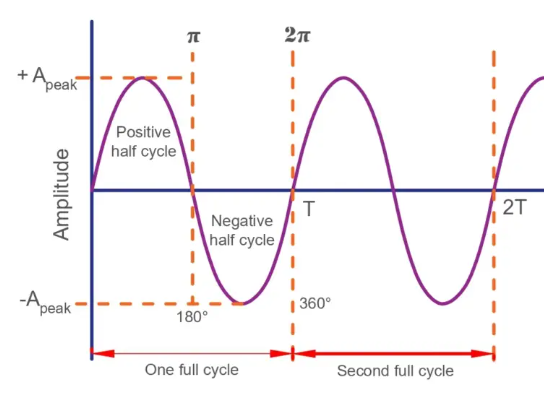
TailDelayDegrees
It delays the sinusoidal wave by an amount of degrees.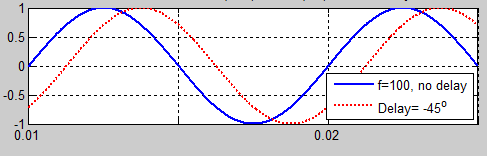
Following how Sinusoidal waves works we can delay it a certain amount of degrees, simulating with math the animation of tails.
SinWave1 is *0
SinWave2 is *1
Sinwave3 is *2 , etc...
Because each section would have the delay of the section before + its section if you want if you want a custom delay for each section of the tail, you can just change this value to a numeric value.
[pi/180] It is just to make the sinusoidal wave formula to work in base of degrees and not radians.
What this is doing is going through the sinusoidal wave at the speed of Angle1, Angle1 can change speeds when you get happier in a smooth way because it has an acceleration, but everything remains on the same cycle and animation. - Custom Tail amplitudes
These are done just multiplicating the entire sin() by a specific value
OR
If you want a different amplitude when happy, you can multiply it by MouthAccelValue, like the following image.
With stuff like this you can also have tails that when happy only the tips moves or they move more when happy
- Adding more tail sections in SinWave#
Just copy paste the last formula and change the multiplication for the value+1
- This can be applied to not just tails but anything that has a sinusoidal movement (There is a LOT of things, I have applied it to twin tails movement, ahoges, wings, walking, etc)
Vitamins version has more programming but is roughly the same idea.
Nizima Live version available now for download, just put it inside the folder "script" inside your model and enable it on the script menu in nizima Live, it will appear new parameters in the "user-defined" parameters menu, for further customization, the .json needs to be open and edited it has //comments to facilitate the change of values.
Please check as well my plugin/software that allows twitch alerts with full nicknames and sub information on Live2D Models using Vtwink
https://katomon.itch.io/vtwink
Ways to contact me:
- Twitter @k4tomon
- Discord in my personal server Discord (or directly add me)
- If you are shy even via mail: k4tomon@gmail.com
Formulas made Katomon.
No AI was/is used.
Download
Click download now to get access to the following files:

Leave a comment
Log in with itch.io to leave a comment.